

This holiday season, I launched https://SNOW.fyi, a new tool for skiers and snowboarders to track conditions for the next 14 days at their favorite resorts.
Below, I explain why it is different from standard weather apps, how it works, and the origin story behind the project.
What Makes SNOW.fyi Different?
There are plenty of weather apps available, and some even charge $50/year for professional results. Why use SNOW.fyi?
1. Solving the Pain of Tracking Multiple Mountains
If you have limited time on the slopes and multiple resort options within driving distance, you want to maximize your experience. Standard weather apps require you to tap through screens dozens of times just to compare four resorts over a 10-day period. It is tedious and inefficient.
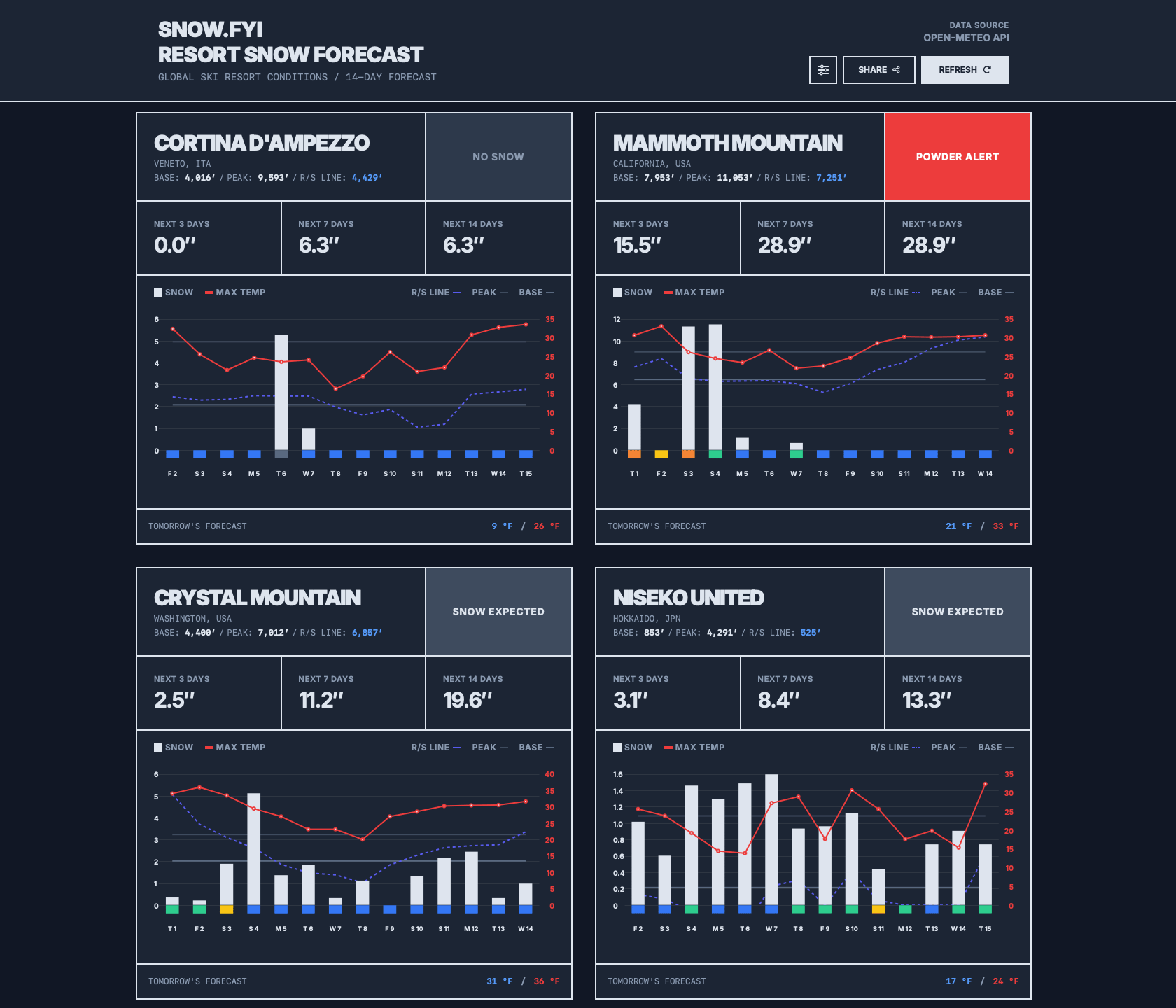
SNOW.fyi solves this. On a desktop, you can compare mountain conditions in seconds. On mobile, it takes just a few scrolls.
2. Know Where the Snow Is Best
Most skiers know the snow is better on the upper mountain. But how high is “upper”? This depends on the daily R/S line (Rain/Snow line), also known as the “freezing level.”
- Above the line: Drier, higher-quality powder.
- Near/Below the line: Prone to heavy, wet precipitation.
SNOW.fyi visualizes this by comparing the day’s R/S line against the mountain’s base and peak elevation.
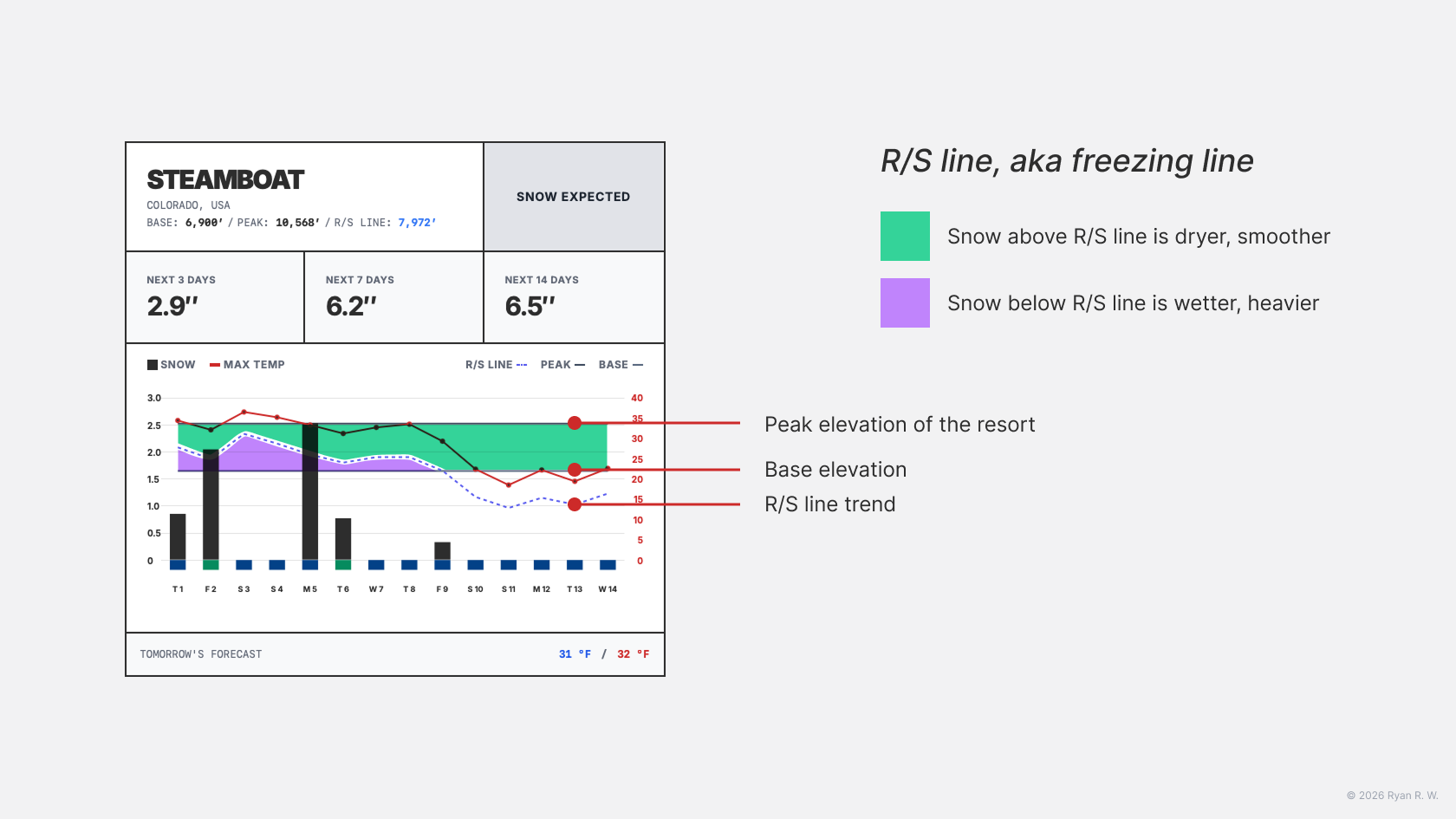
- R/S line below the base: Great news. The entire mountain should have decent snow.
- R/S line above the peak: You will likely deal with wet, heavy snow.
- In the middle: Stay above the R/S elevation for the smoothest ride.
3. A Wind Scale for Comfort and Safety
Wind speed determines lift status, yet I found no specific wind scale for ski resort operations. I conducted research and created the Ryan Wu Ski Resort Wind Scale System.
It is a 7-level system. Level 1 is calm; Level 7 indicates wind strong enough to halt sensitive chairlifts (gondolas or bubbles).
|
Level |
Range (mph) |
Range (km/h) |
Operational State |
|
1 |
0–4 |
0–6.4 |
Calm (Little to no wind) |
|
2 |
4–10 |
6.4–16.1 |
Light (No Impact) |
|
3 |
10–16 |
16.1–25.8 |
Gentle (Breeze) |
|
4 |
16–22 |
25.8–35.4 |
Moderate (Wind Chill Factor) |
|
5 |
22–28 |
35.4–45.1 |
Alert (Bubble Monitor) |
|
6 |
28–34 |
45.1–54.7 |
High (Slow Down / Hold Risk) |
|
7 |
≥ 34 |
≥54.7 |
Severe (Conservative Hold) |
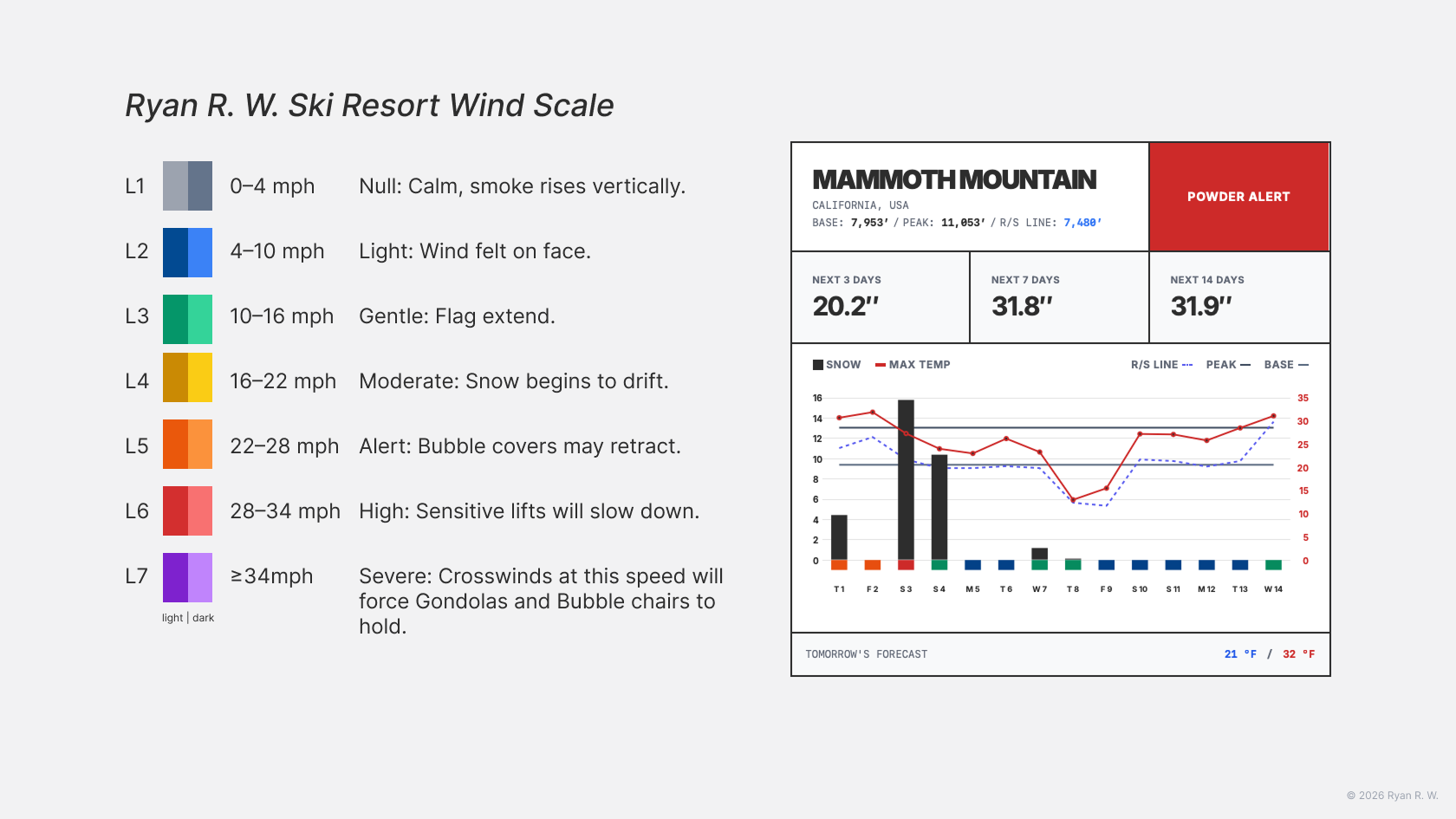
You can now easily spot days where operations may be disrupted or when you need to layer up for wind chill (indicated by a yellow card).
4. Rain Indicator
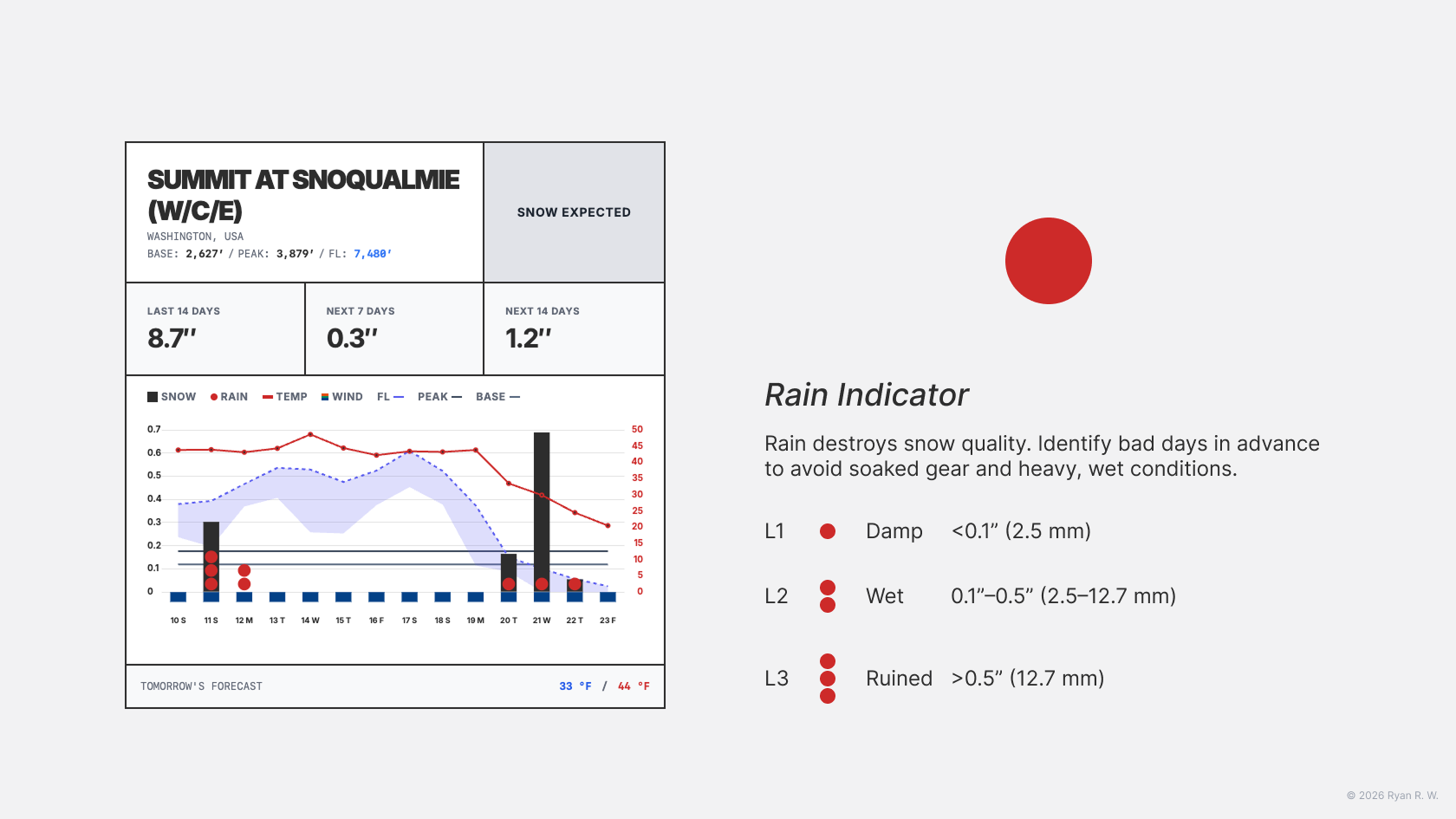
Rain degrades snow structure. It creates heavy, high-friction conditions that make turning difficult and increase the risk of injury. SNOW.fyi uses a three-level system to categorize this impact:
- Level 1: Damp, just a nuisance: <0.1″ (2.5 mm)
- Level 2: Wet, gear gets soaked: 0.1″–0.5″ (2.5–12.7 mm)
- Level 3: Ruined, the day is ruined: >0.5″ (>12.7 mm)
5. Spot the “Bluebird Day”
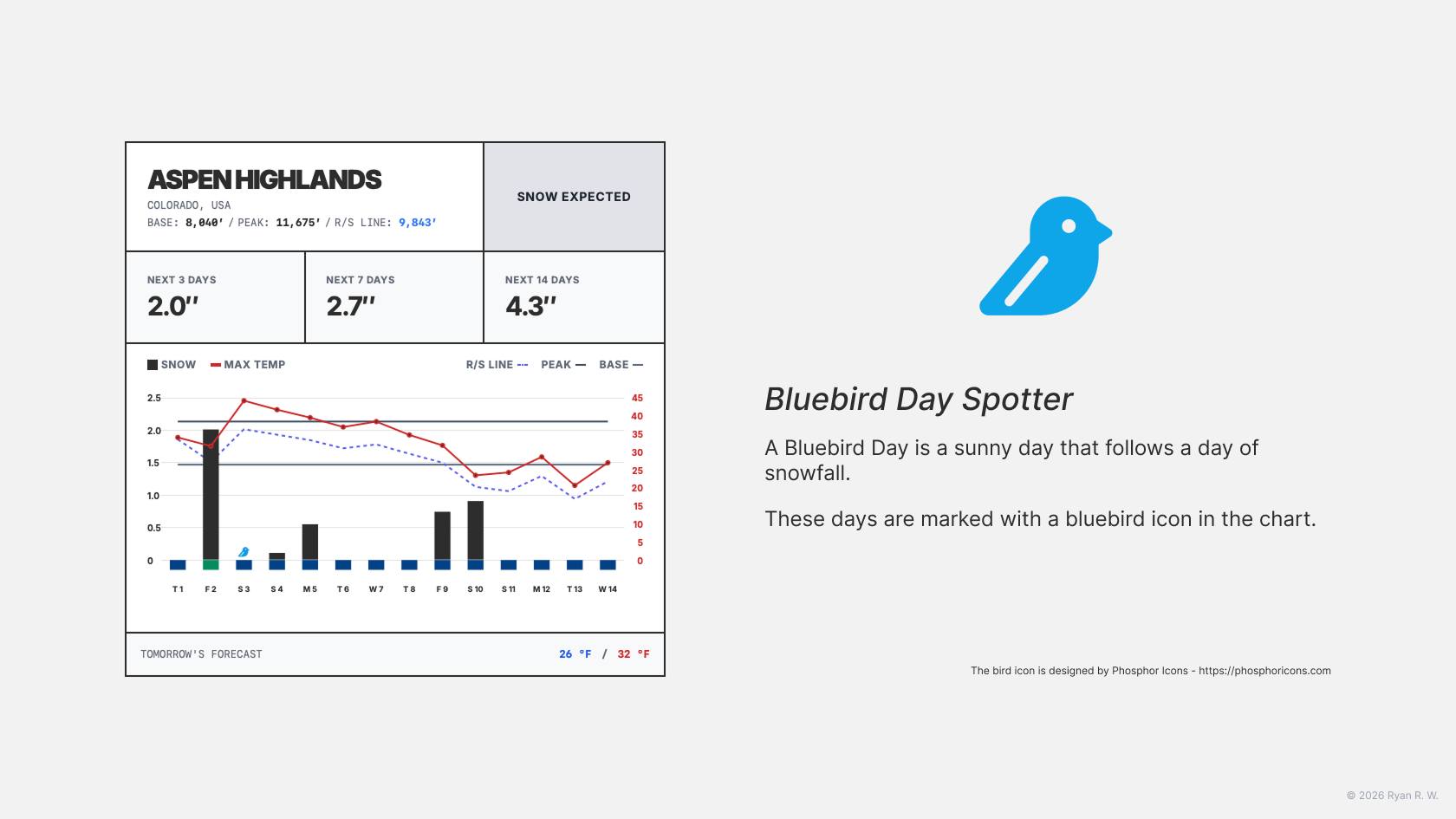
A “Bluebird Day”—a sunny day following fresh snow—offers superior visibility and ideal conditions. SNOW.fyi forecasts these days and marks them with a bluebird icon. Request your PTO ahead of time to catch them.
6. Easy Access & Privacy
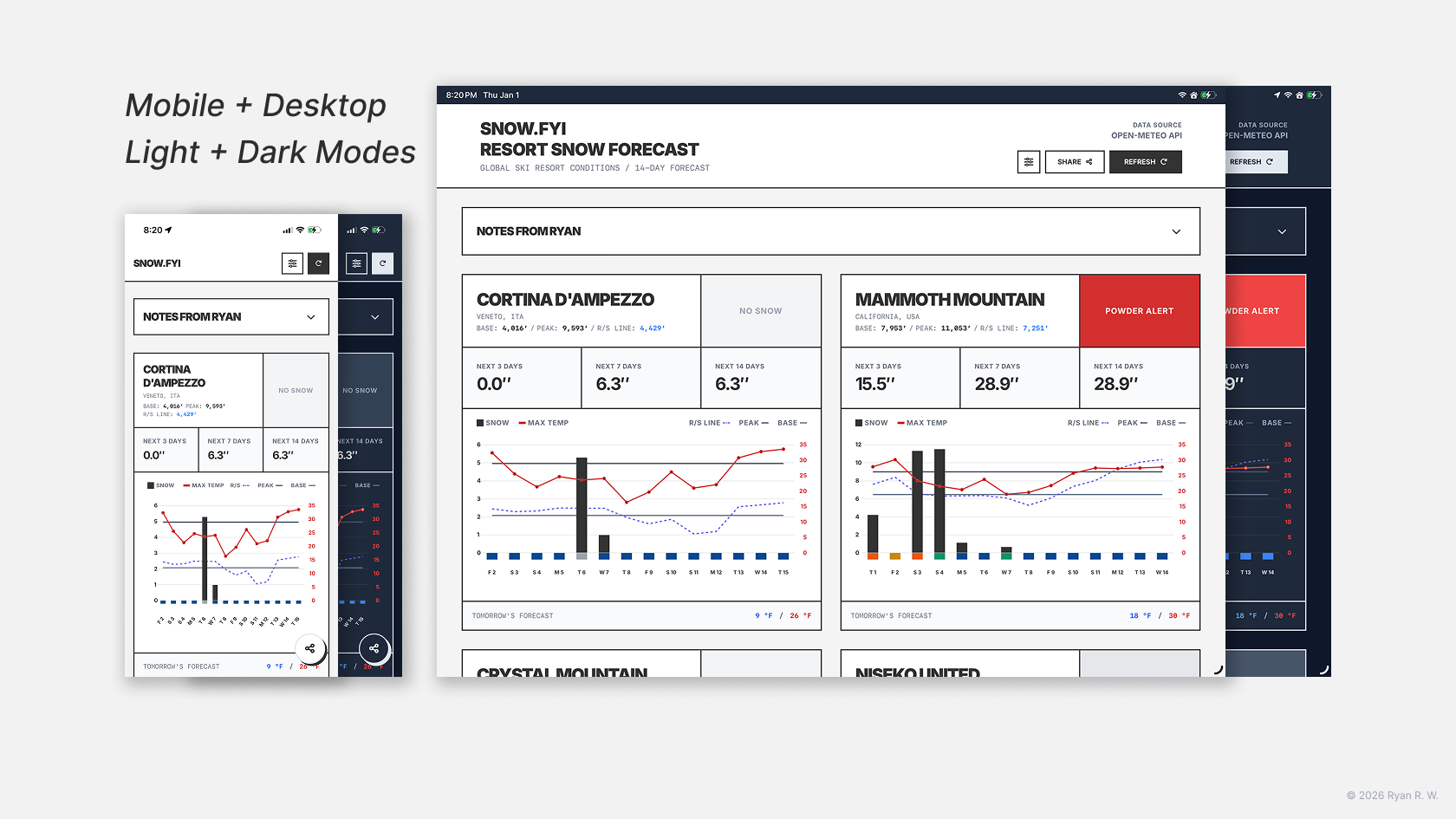
SNOW.fyi is a web-based tool adaptive to desktop and mobile.
- No friction: No app download, no account registration, and no SMS/Email verification codes.
- Local Storage: Your resort choices and unit preferences (Imperial/Metric) are stored locally on your device.
- Note: Because settings are local, they do not sync between your phone and desktop.
How to Use It
Getting Started
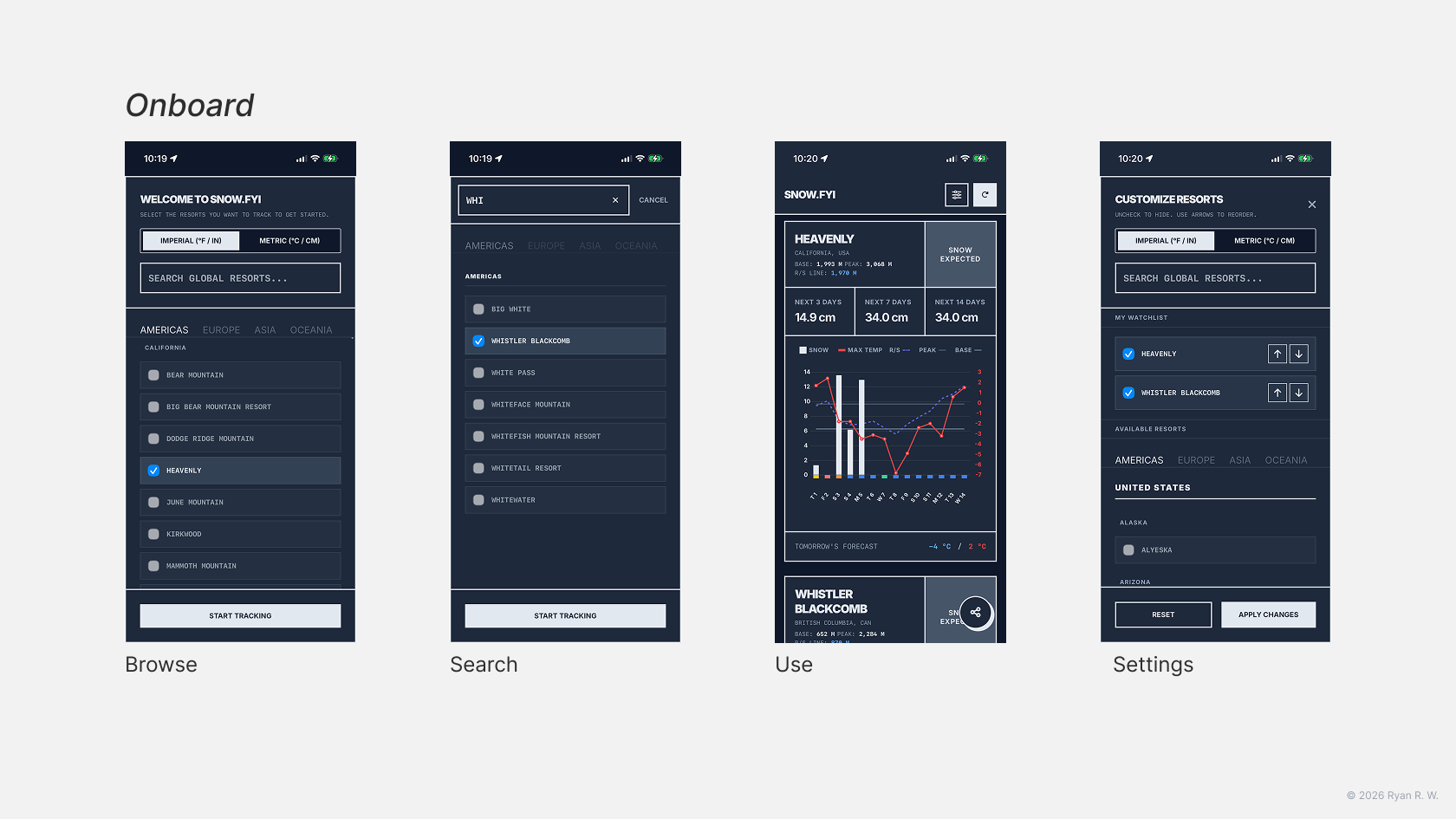
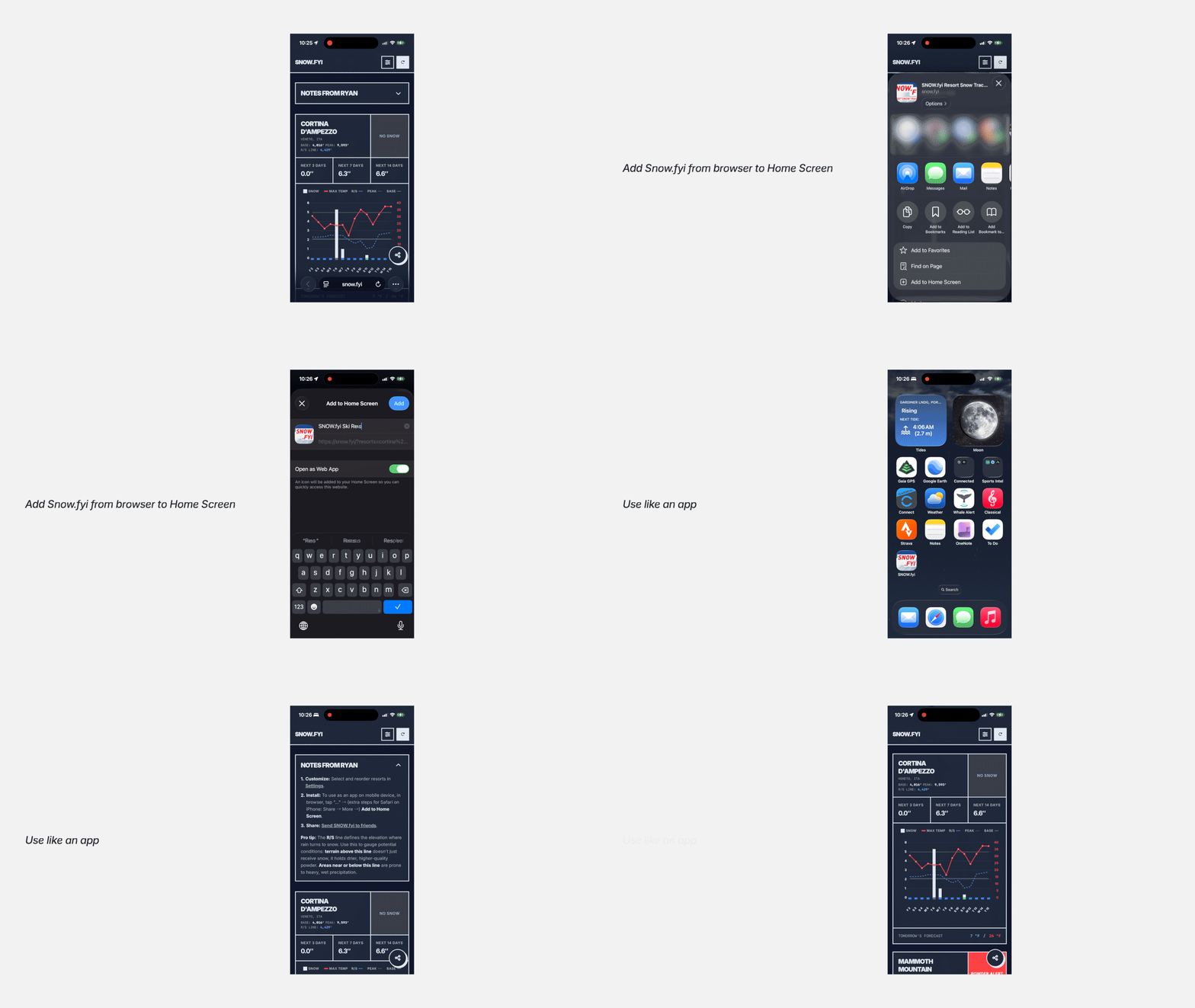
When you first visit SNOW.fyi, search for or select the resorts you want to track. Choose your preferred unit system, and click “Start Tracking” to view your dashboard.
Pro Tip: For easier access on mobile, add SNOW.fyi to your Home Screen (iOS: Share → Add to Home Screen).
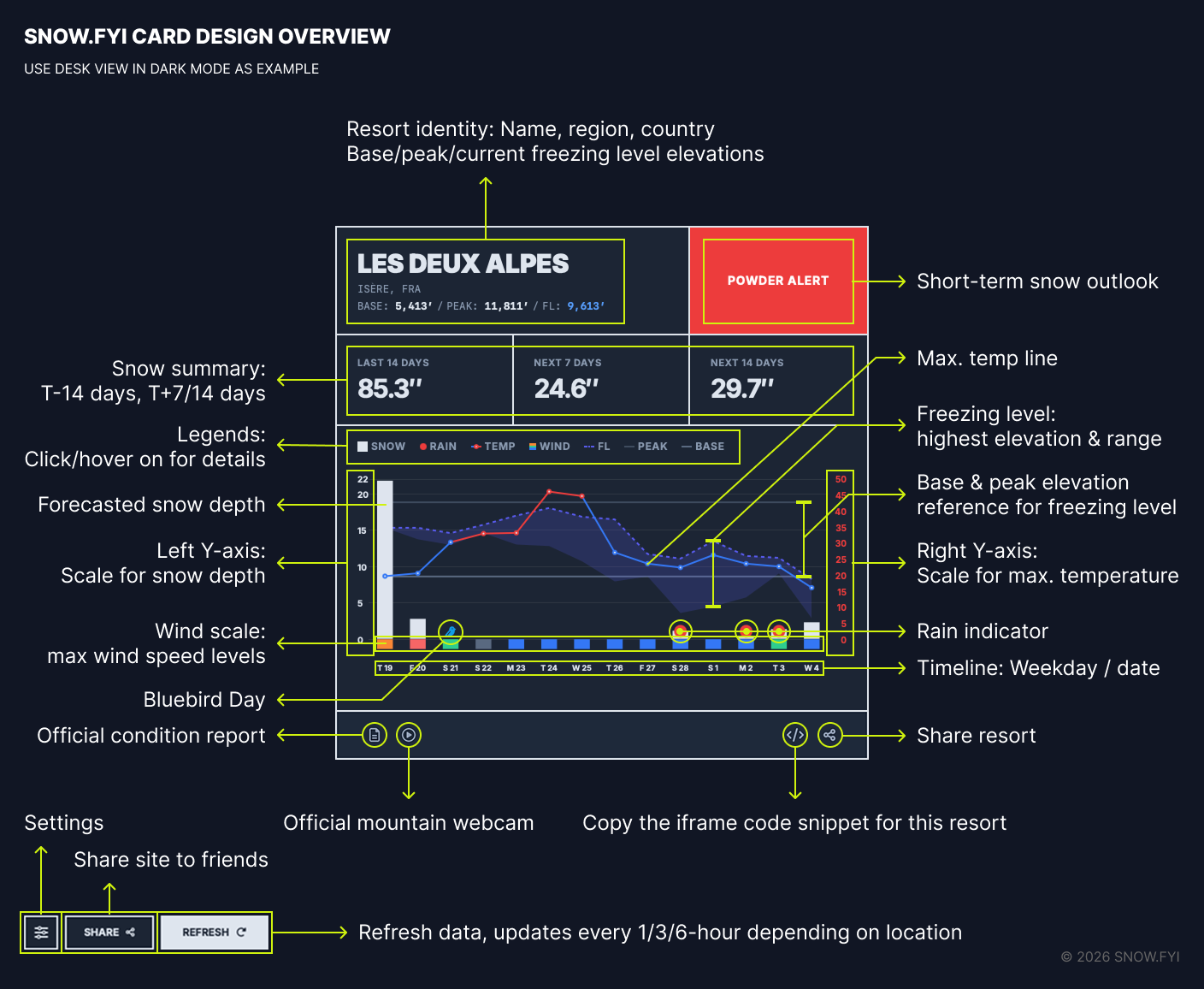
Reading the Card
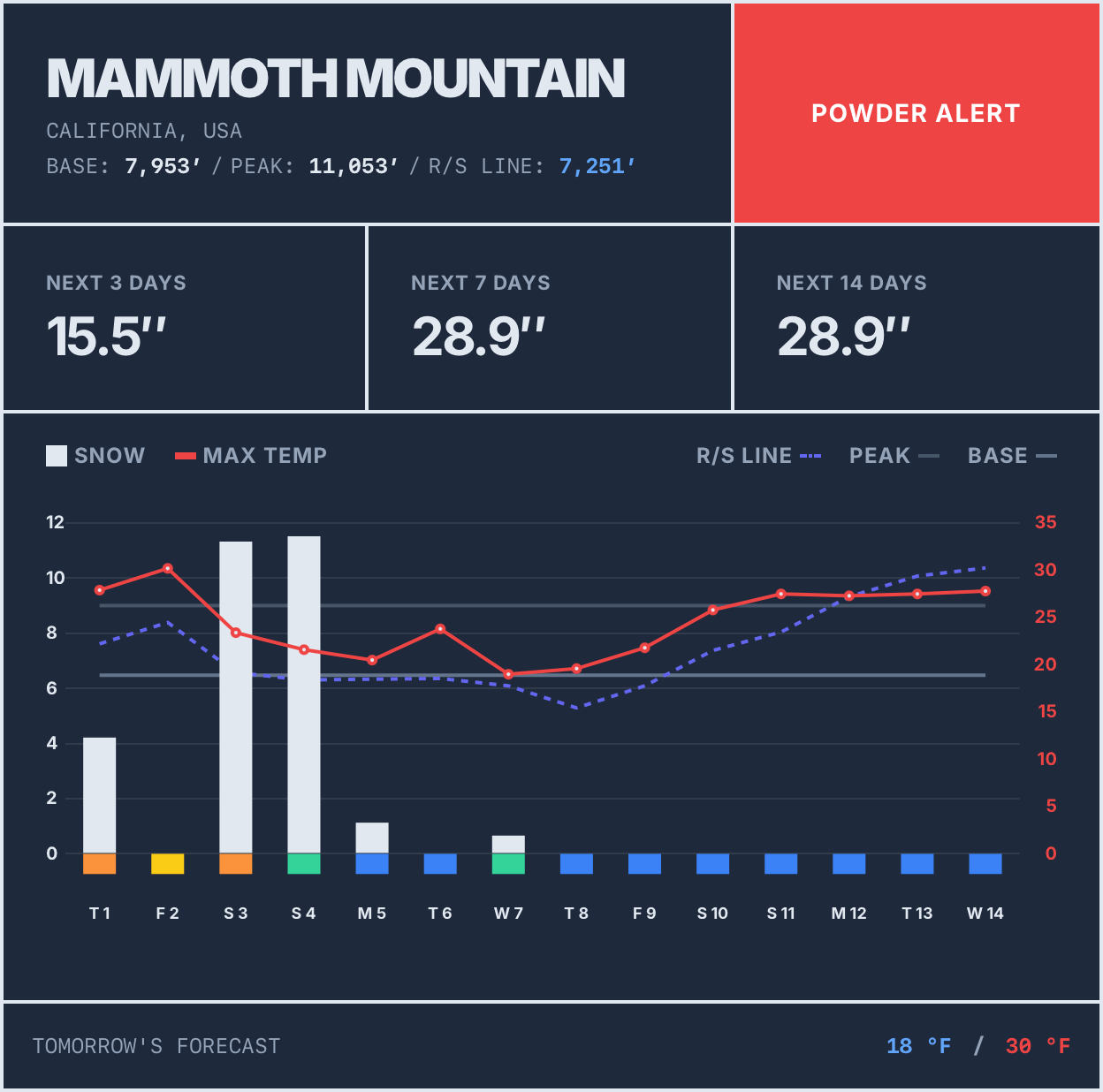
The resort card has two sections:
- Quick Summary: Resort name, base/peak elevation, current R/S line, and snow status (e.g., Powder Alert).
- Detailed Forecast: Daily forecast of snow, max temp, R/S elevation, and wind speed.
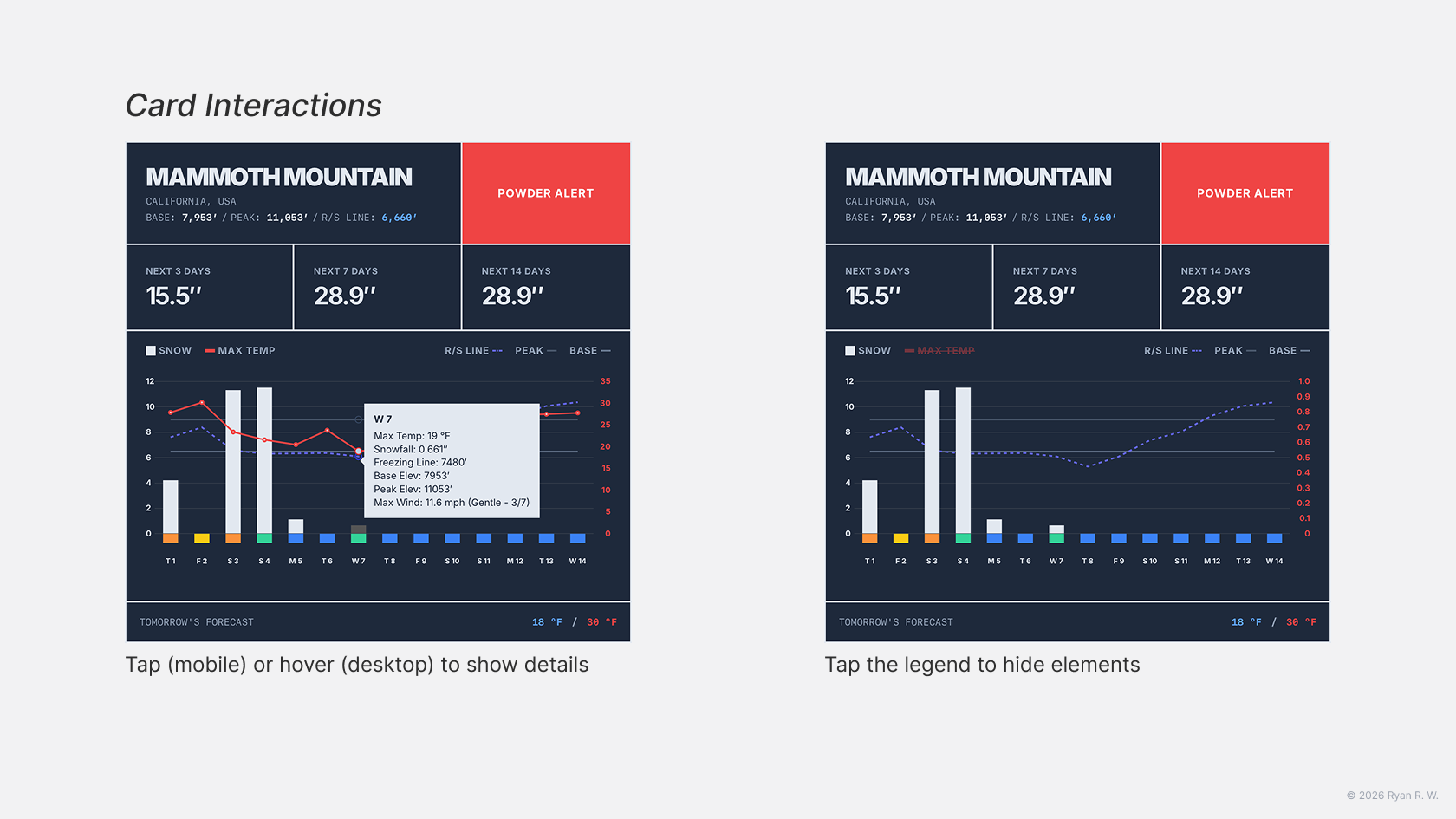
- Mobile: Tap a day to see details; Desktop: Hover over a day to see details.
- Tap the legend to toggle metrics on the chart.
Updating Settings
To add/remove resorts or reorder your list, tap the settings button, adjust the “CUSTOMIZE RESORTS” panel, and click “Apply Changes.”
Support the Project
Share with Buddies
If you enjoy SNOW.fyi, please share it! Click the Share button to send it to friends or family. This is the best way to support the project.
Give Feedback
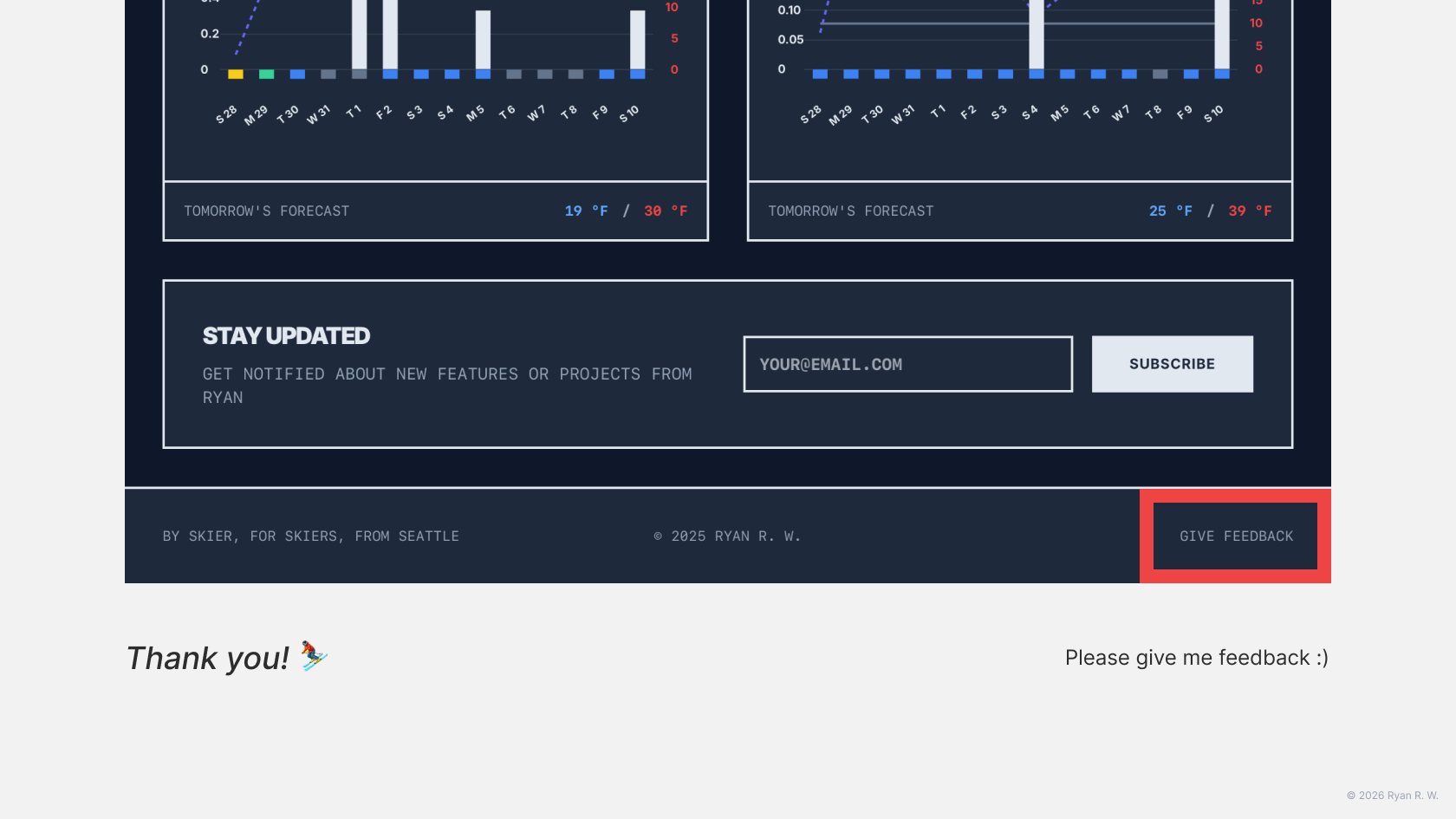
SNOW.fyi grows based on user feedback. Use the “Give Feedback” button at the bottom of the page to rate your experience, suggest features, or report bugs.
The Story Behind SNOW.fyi
The Origin
I live in Seattle and have been skiing for three years. Planning ski vacations was always stressful; I found myself tapping through weather apps 50+ times just to compare snow depth across four resorts.
This year, while planning my Christmas vacation, I decided to build a solution. I created a simple dashboard called “Ryan’s Snow Tracker” and hosted it on my blog to track Pacific Northwest (PNW) resorts.
Community Response
I shared the dashboard with a few friends and the “Ski/Snowboard Buddies Seattle” Facebook group. The response was encouraging—my pain point was shared by the community. Requests started coming in:
Can you cover BC?
What about Epic Pass mountains?
Metric units?
This is perfect it’s only missing wind forecasts.
Evolution
Since the initial launch, I have gradually added:
- Coverage for Washington, British Columbia, Alberta, and eventually 390+ major global resorts.
- Night mode, R/S Line visualization, and the Wind Scale system.
- Watchlist management and Metric/Imperial support.
From Blog to Brand
After showing the snow tracker to my primary care provider during a checkup, she asked for the link. Writing “https://catalium.net/pnwsnowtracker/” on a sticky note made me realize the name was too cumbersome for user communication.
After I got back home, I bought the domain SNOW.fyi. Two days later, SNOW.fyi’s dedicated server fired up.
No Skiing, Just Building
Ironically, I requested PTO for a ski trip but ended up cancelling it to work on SNOW.fyi. I spent 12+ hours a day building during my vacation. It was worth it. I enjoyed applying my background in product management, design, and engineering to a passion project.
If you are interested in the development journey, feel free to follow me on Threads/X or sign up for the newsletter at the bottom of the site.
There is a saying, I think it’s true:
Every skier is a meteorologist.
Thank you!
Special thanks:
- Emily and Eric: For bringing me into skiing.
- Michael Snyder: His Pacific Northwest Weather Watch YouTube channel taught me many meteorology basics.
Really love what you’ve done here. I truly believe you’re making something great. I’m going to stay tuned and see if this becomes more useful than OpenSnow to me.
Thanks!
Sebastian
Fellow Husky from Shoreline
Hi Sebastian, thanks a lot for your support! Go dawgs!
I’ve received so many high-quality feedback from users, which has helped me add new features and improve the overall experience. Let’s keep the momentum going!
[…] is a month old now. Thank you everyone for supporting this project and giving me valuable feedback. SNOW.fyi would not […]